HAMRS1.0.7
Publisher Description


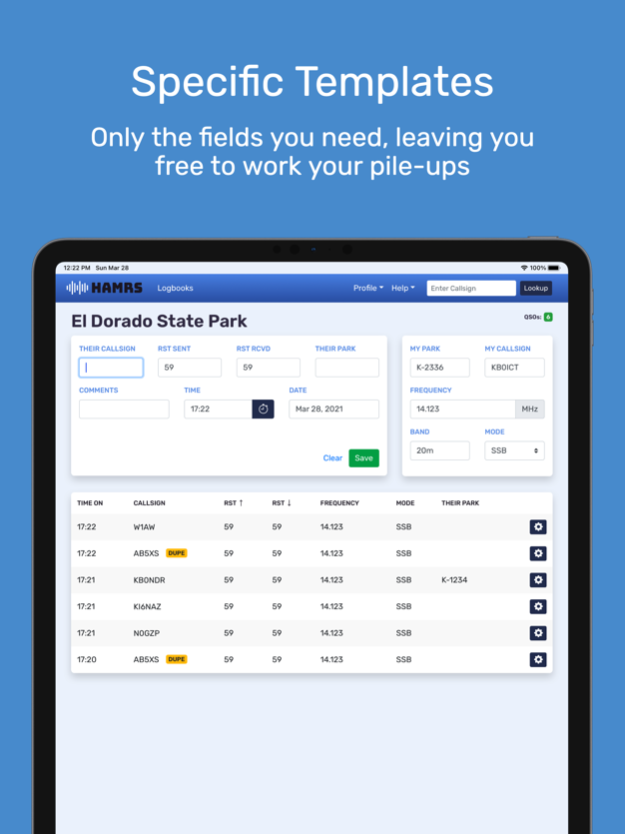
A simple amateur radio logger designed specifically for portable activities, like Parks on the Air (POTA), Summits on the Air (SOTA) Field Days, etc.
Mar 26, 2024
Version 1.0.7
Updated POTA Parks DB
About HAMRS
The company that develops HAMRS is Jarrett Green. The latest version released by its developer is 1.0.7.
To install HAMRS on your iOS device, just click the green Continue To App button above to start the installation process. The app is listed on our website since 2024-03-26 and was downloaded 39 times. We have already checked if the download link is safe, however for your own protection we recommend that you scan the downloaded app with your antivirus. Your antivirus may detect the HAMRS as malware if the download link is broken.
How to install HAMRS on your iOS device:
- Click on the Continue To App button on our website. This will redirect you to the App Store.
- Once the HAMRS is shown in the iTunes listing of your iOS device, you can start its download and installation. Tap on the GET button to the right of the app to start downloading it.
- If you are not logged-in the iOS appstore app, you'll be prompted for your your Apple ID and/or password.
- After HAMRS is downloaded, you'll see an INSTALL button to the right. Tap on it to start the actual installation of the iOS app.
- Once installation is finished you can tap on the OPEN button to start it. Its icon will also be added to your device home screen.
Program Details
System requirements
Download information
Pricing
Version History
version 1.0.7
posted on 2024-03-26
Mar 26, 2024
Version 1.0.7
Updated POTA Parks DB
version 1.0.6
posted on 2022-05-02
May 2, 2022 Version 1.0.6
* Added virtual number keyboard for mobile devices for callsign input
* ESC now clear current form
* Logged POTA Spots can now be hidden
* QRT POTA Spots can now be hidden
* Condensed POTA Spots Toolbar
* Added 'Call not found' pop-up
* Logbook form now auto-focuses to Title input
* Allow decimals and values lower than 1 in TX_PWR field
version 1.0.5
posted on 2022-03-31
Mar 31, 2022 Version 1.0.5
.0.5
ENHANCEMENTS
* Log QSOs table now searchable
* 'My Park' field now displays pop-up of your Park
BUG FIXES
* Fixed decimalsg on POTA Spot Cards and Table
* Debounced All QSOs table search, and show working state.
version 1.0.3
posted on 2022-03-14
Mar 14, 2022 Version 1.0.3
ENHANCEMENTS
- Rewrote live QSO Time logic. Now counts seconds as well
BUGS FIXED
- Generic Template now persists TX power betweens QSOs
- Throttle Call lookup, rather than debouncing input
- Replace foreign keyboard dashes in Park input fields
- Fixed overflowing POTA form on smaller devices
- POTA template no longer allows future dates
- Time Input now limited to 23:59
- Leaving out MODE from templates no longer create an ‘undefined’ entry in ADIF Files
version 1.0.1
posted on 2022-02-14
Feb 14, 2022 Version 1.0.1
1.0.1
ENHANCEMENTS
* Added zero slashed font and used it for tables and inputs that had numeric data or callsigns
* POTA Template:
* Updated persistence pattern
* Added `MY_STATE` and `MY_CNTY` fields to expanded fields section
* `MY_STATE`, `MY_CITY`, `MY_CNTY` persists across QSOs
* Entering a park with multiple locations prompts you to pick the state you're in
* Generic Template: Added `Date` to Entries table
### BUGS FIXED
* Fixed Table & ADIF sorting. Now sorted by QSO_DATE and TIME_ON
* Fixed incorrect QSO_DATE_OFF for manual QSO dates
* Fixed time pausing bug
* Fixed bug that prevented users from being able to create logbook after getting a validation error
* Fixed POTA Spot table view showing all spots already in log (all green)
* Field Day/Winter FD Templates: Combined and fixed some bugs:
* 'Clear' Button now only clears the other operator's information.
* Can now edit Their Class/Category, and Section on QSOs
* Normalized data shown in entries table
* Fixed DUPE checker lag
version 1.0.0
posted on 2022-01-27
Jan 27, 2022 Version 1.0.0
Important: This version replaces the old database and schema with a more reliable one. It requires migration of your data, and you'll be prompted through the process. After that step, everything should just work exactly as it should.
Other Enhancements:
* Updated Winter Field Day Template with Power Field, and persistence
* Tweaked error reporting to provide me a bit more information when errors occur
version 0.11.6
posted on 2021-11-22
Nov 22, 2021 Version 0.11.6
* Ensure desktop versions run in single instance mode
* Removed 'Lookup All' feature temporarily
* Moved Delete to bottom of QSO actions list
* Increased timer interval to free up resource allocation
* Increased geolocation interval to free up resource allocation
* Fixed a stability issue when updating QSOs
* Fixed bug that cleared grid when tabbing from their park field.
* Fixed ADDRESS and SUBMODE adif fields exporting when null
* Made time button red when not in use
* When POTA Reference returns multiple States, show an alert
* Editing QSO My Park field updates your grid and state
version 0.11.5
posted on 2021-10-24
Oct 24, 2021 Version 0.11.5
**BUGS FIXED**
* Fixed THEIR PARK input not working on iOS 12
version 0.11.4
posted on 2021-10-15
Oct 15, 2021 Version 0.11.4
## 0.11.4
**ENHANCEMENTS**
* Updated POTA Park list with new parks
* Updated Generic Template Layout
* QSO time is now live and can be paused to allow for entering back-dated logs
* QSO map now draws lines from MY_GRIDSQUARE to GRIDSQUARE for each QSO.
* QSO map shows green marker for each MY_GRIDSQUARE fond in logbook
* QSO map caclutates mode of all QSO MY_GRIDSQUAREs to determine where to center when loading map
* Grid Input is now formatted properly
* Changed Band input to a dropdown
* POTA Template requires CALL, MODE, and BAND
* Immediate QRZ and HamQTH credential validation
* Strip whitespace from gridsquares
**BUGS FIXED**
* Always export MODE, BAND, and FREQ fields to ADIF, even if null
* Adding QRZ or HamQTH credentials sets that service to the global lookup provider
* Disable 'Lookup' and 'Lookup All' buttons if offline
* Fixed 160m band selection
* Fixed Edit QSO Spacing
version 0.11.3
posted on 2021-08-11
Aug 11, 2021 Version 0.11.3
## 0.11.3
**BUGS FIXED**
* Convert commas to decimals in frequency for internationalization
* Logged spots were not taking into account park reference
